> For the complete documentation index, see [llms.txt](https://docs.deepnoise.ai/llms.txt). Markdown versions of documentation pages are available by appending `.md` to page URLs; this page is available as [Markdown](https://docs.deepnoise.ai/product-guides/controls.md).
# Controls
## **Orb View**
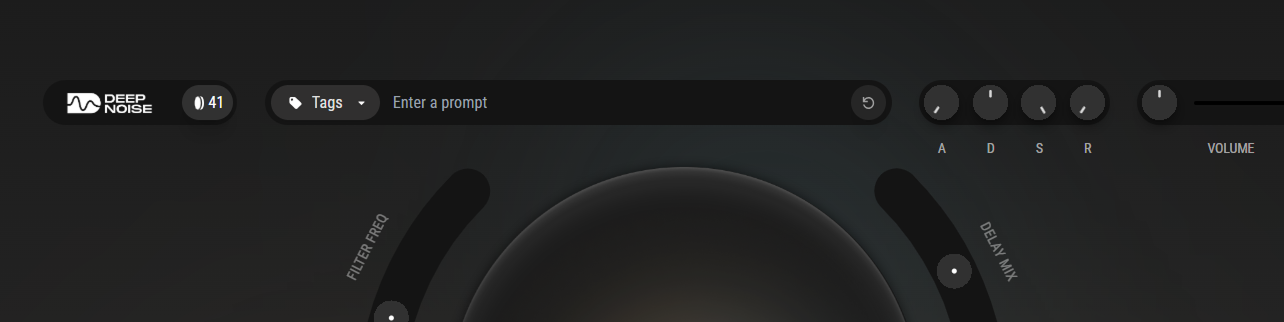
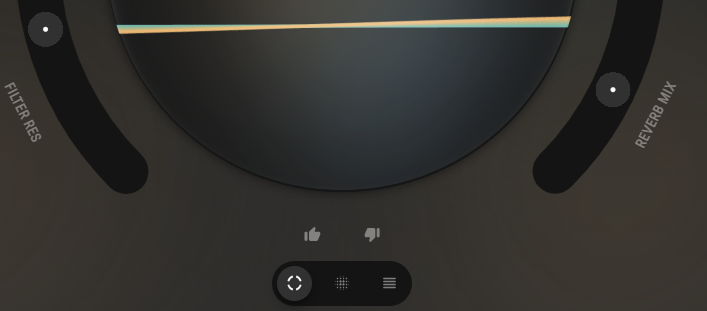
The Orb provides immediate access to your most-used performance parameters through an intuitive visual interface.
**Main Orb Parameters:**
* **Filter Freq (Frequency)** – Controls the cutoff point where frequencies begin to be attenuated. Lower values create darker, warmer tones; higher values result in brighter, more open sounds.
* **Filter Res (Resonance)** – Emphasizes frequencies at the cutoff point, creating a peak that adds character and bite. Higher resonance produces a more pronounced, sometimes whistling quality.
* **Delay Mix** – Balances between the dry (original) signal and wet (delayed) signal. Turn up to add rhythmic echoes and spatial depth to your sound.
* **Reverb Mix** – Controls the blend between dry and wet reverb signals. Increase to place your sound in larger acoustic spaces, from subtle rooms to vast halls.
**Interface Elements:**
* **Top Bar** – Displays remaining generation credits, tag management, prompt field, quick ADSR macro controls, and master volume
* **Bottom Bar** – Switch between Orb and Detailed views, provide instant feedback with like/dislike buttons to help improve AI generations
## **Detailed View**
Access comprehensive synthesis parameters for precise sound design and professional production techniques.
**Filter Section**
* **Frequency** – Sets the exact cutoff frequency in Hz where the filter begins affecting the signal
* **Resonance** – Controls the amplitude boost at the cutoff frequency (0-100%), adding harmonic emphasis
* **Envelope Amount** – Determines how much the filter envelope modulates the cutoff frequency over time
* **Type** – Choose your filter mode:
* *Low Pass*: Removes high frequencies, creating warmer tones
* *High Pass*: Removes low frequencies, creating thinner, brighter sounds
* *Band Pass*: Preserves only a specific frequency range, creating focused, narrow tones
**Filter Envelope (ADSR)**
* **Attack** – Time taken for the filter to open from its initial state to maximum (0ms - 10s)
* **Decay** – Time for the filter to fall from maximum to the sustain level (0ms - 10s)
* **Sustain** – Level where the filter remains while a note is held (0-100%)
* **Release** – Time for the filter to close after the note is released (0ms - 10s)
**Delay Section**
* **Time** – Sets the delay interval between echoes (1ms - 2000ms), often synced to tempo
* **Feedback** – Controls how much delayed signal feeds back into itself, creating multiple echoes (0-95%)
* **Mix** – Wet/dry balance determining the prominence of the delay effect (0-100%)
* **Type** – Select delay character (standard, ping-pong, analog emulation)
**Reverb Section**
* **Decay** – Duration of the reverb tail, simulating room size from tight spaces to cathedrals (0.1s - 30s)
* **Mix** – Balance between the direct sound and reverberant signal (0-100%)
---
# Agent Instructions
This documentation is published with GitBook. GitBook is the documentation platform designed so that both humans and AI agents can read, navigate, and reason over technical content effectively. Learn more at gitbook.com.
## Querying This Documentation
If you need additional information that is not directly available in this page, you can query the documentation dynamically by asking a question.
Perform an HTTP GET request on the current page URL with the `ask` query parameter, and the optional `goal` query parameter:
```
GET https://docs.deepnoise.ai/product-guides/controls.md?ask=&goal=
```
`ask` is the immediate question: it should be specific, self-contained, and written in natural language.
`goal` is optional and describes the broader end goal you are ultimately trying to accomplish on behalf of the user. GitBook uses it to tailor the answer towards what is most useful for that goal.
The response will contain a direct answer to the question and relevant excerpts and sources from the documentation.
Use this mechanism when the answer is not explicitly present in the current page, you need clarification or additional context, or you want to retrieve related documentation sections.